QR Code Scanner Widget
OverviewDirect link to Overview
The QR code scanner tile of the palette (Advanced group, widget type qrcode) reads QR codes with the camera of the device and gives the decoded text to a function of the page.
The widget only runs on interfaces still on the old version of the engine: their Page Settings show This page runs on an old version of the SoftyFlow engine. and an Upgrade button. On every other interface, including any interface created today, the palette still offers the tile and the builder gives no warning, but the page cannot display the widget: on a screen where the widget is Available, the page does not open and shows Error 500. The same happens after Upgrade on an interface that holds the widget.
On these interfaces, remove the widget and read QR codes with an Html widget.
Reading QR Codes with an Html WidgetDirect link to Reading QR Codes with an Html Widget
On these interfaces, the reader components are used from an Html widget:
Add an Html widget and, with Edit HTML, give it this content:
<div style="max-width: 320px">
  <qrcode-stream @decode="onScan"></qrcode-stream>
</div>
In the Code page, add the function to Functions. It receives the decoded text. Here it fills the field whose Variable/Model is
asset:{ onScan(value) { this.models.asset = value; } }
<qrcode-stream> shows the camera image. <qrcode-capture @decode="onScan"></qrcode-capture> shows a file button instead, to take a photo or choose an image.
- Library: since 8.6, the reader library is loaded only on pages that contain
qrcodein their widgets or their code. The content above contains it, so there is nothing else to load. - Camera: browsers give access to the camera only on an HTTPS site (or
localhost), after the user allows it.
Widget Settings on Old InterfacesDirect link to Widget Settings on Old Interfaces
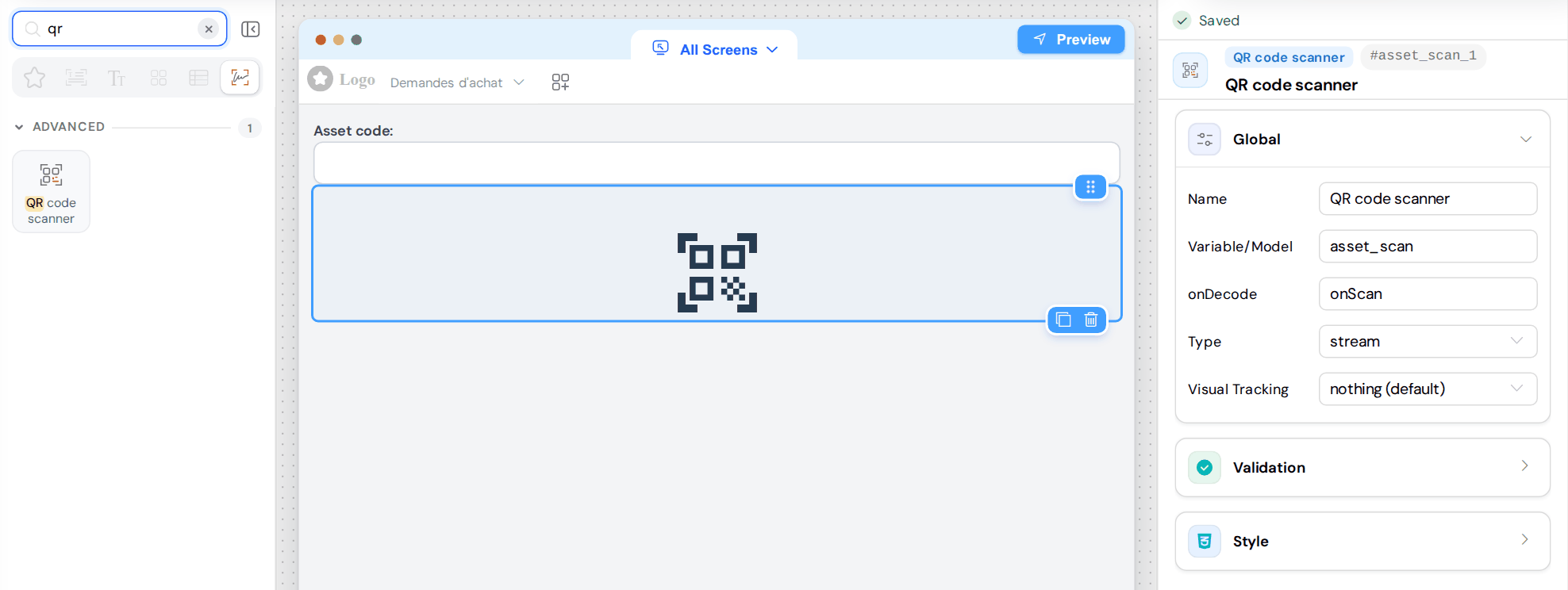
The Global card holds the settings of the widget:
| Setting | Description |
|---|---|
| Name | Name of the widget in the builder. |
| Variable/Model | Identifier of the widget. It does not receive the decoded text. |
| onDecode | Name of a function of Functions (onScan, without parentheses). It receives the decoded text and must store it. |
| Type | stream: camera image. upload: button to take a photo or choose an image. |
| Visual Tracking | With stream only, what is drawn over a detected code: nothing (default), outline, centered text or bounding box. |