External Data Sources (EDS) - Complete Guide
OverviewDirect link to Overview
An External Data Source (EDS) connects a Softyflow application to an external database or service. Applications can use the connection to read or write data, subject to the permissions of the configured account.
Before you start, obtain the server address, credentials and network access required by the source. Keep separate connection settings for Test, UAT and Production. Use an account with only the permissions your application needs.
Choose the source type below, enter its connection settings, then test the connection in the intended environment.
Supported EDS TypesDirect link to Supported EDS Types
Choose one of these source types:
- Relational Databases: MySQL, PostgreSQL, Oracle Database, Microsoft SQL Server
- Cloud Data Warehouses: Snowflake
- API Integrations: Fully customizable REST APIs
- Directory Services: LDAP (currently in Beta)
2. EDS Configuration by TypeDirect link to 2. EDS Configuration by Type
Open Resources → External Database (EDS) in the Softyflow IDE. Choose a source type, then fill in the settings listed below.
2.1. MySQLDirect link to 2.1. MySQL
Use this type to connect to a MySQL database.
Configuration Steps:
- In the EDS section, create a new data source and select "MySQL" as the type.
- Fill in the required connection parameters (Host, User, Password, Database) for each environment: TEST, UAT, and PROD.
- (Optional) Configure advanced settings using a JSON object in the
optionsfield for finer control over the connection behavior. - Crucially, use the Test Connection button for each environment before saving to validate that the parameters are correct and the database is accessible.
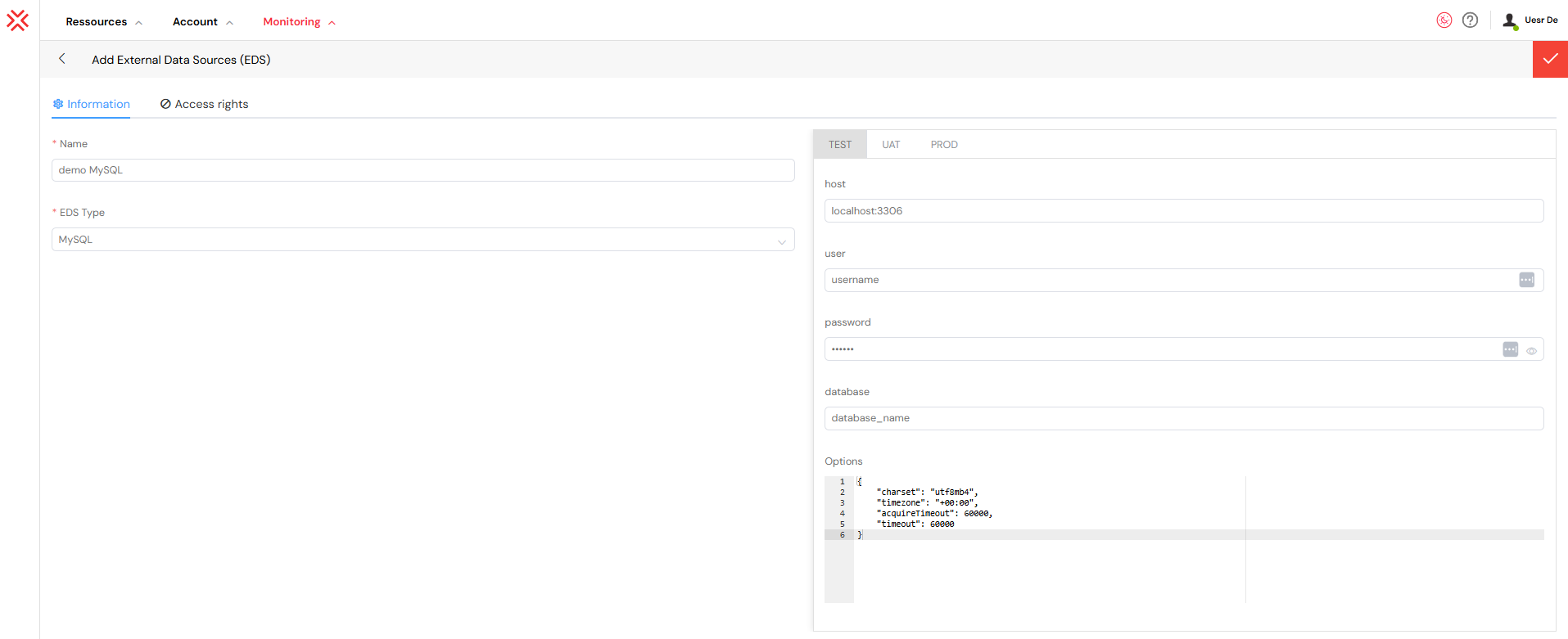
Common Advanced Options:
The JSON options field allows for advanced configuration to meet specific security or performance needs.
{
  "charset": "utf8mb4",
  "timezone": "Z",
  "ssl": {
    "rejectUnauthorized": true,
    "ca": "..."
  },
  "acquireTimeout": 30000,
  "timeout": 60000
}
charset: Defines the character encoding.utf8mb4is highly recommended to support a full range of Unicode characters, including emojis.timezone: Sets the database timezone (e.g.,Zfor UTC).ssl: Configures SSL for a secure, encrypted connection. It is critical to setrejectUnauthorizedtotruein production.acquireTimeout: The maximum time (in milliseconds) to wait for a connection from the pool.timeout: The maximum time (in milliseconds) a query is allowed to run before being aborted.
2.2. PostgreSQLDirect link to 2.2. PostgreSQL
Use this type to connect to a PostgreSQL database.
Connection Parameters: The configuration for PostgreSQL mirrors that of MySQL, requiring the standard host, user, password, and database details.
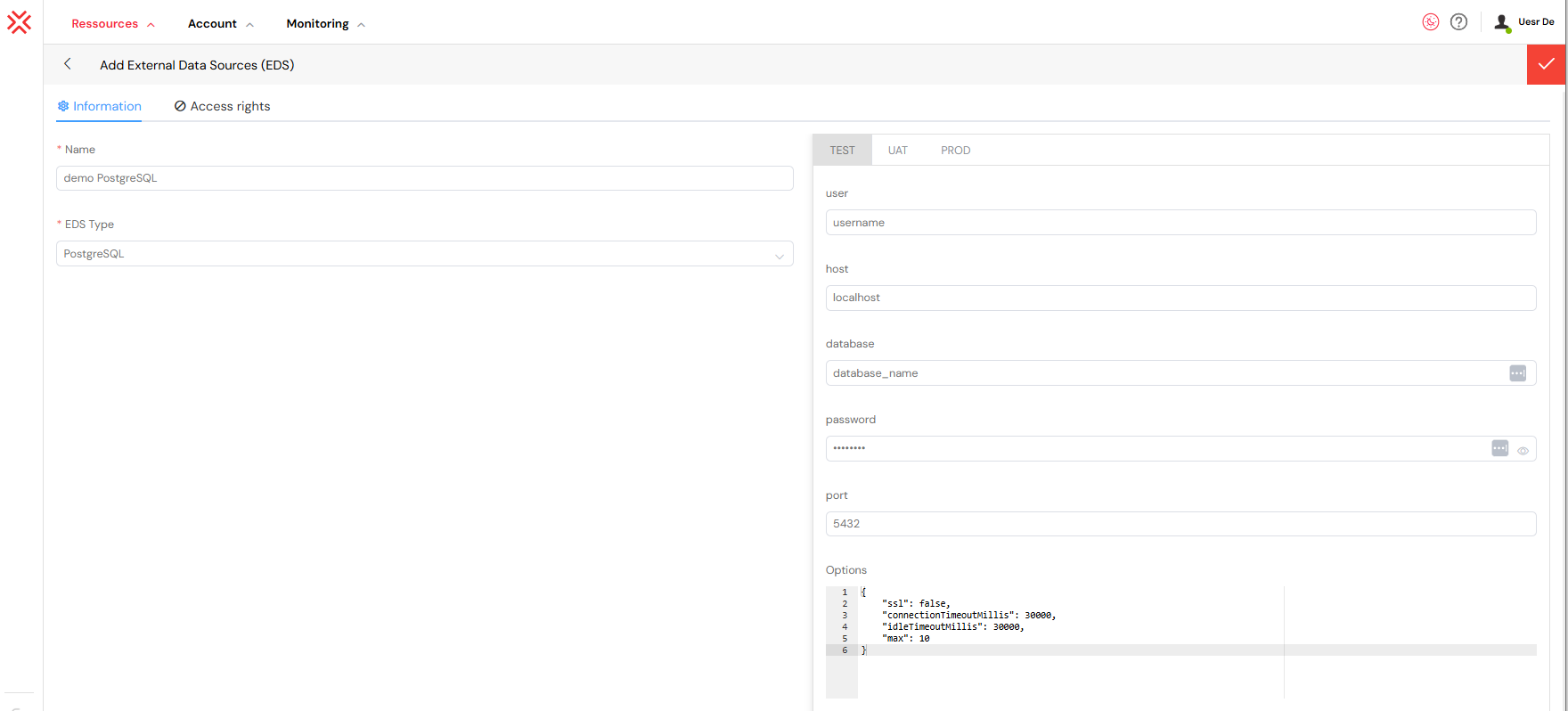
Advanced Configuration Example:
This JSON object configures a secure PostgreSQL connection with specific timeouts. The ssl object can disable rejection of unauthorized certificates, which is useful for development environments with self-signed certificates, but should be avoided in production.
{
  "ssl": {
    "rejectUnauthorized": false,
    "ca": "...",
    "key": "...",
    "cert": "..."
  },
  "statement_timeout": 30000,
  "query_timeout": 30000,
  "application_name": "Softyflow"
}
statement_timeout: Aborts any statement that takes more than the specified number of milliseconds. This prevents long-running queries from impacting overall database performance.application_name: Sets a custom application name in PostgreSQL logs, making it easier to identify and debug Softyflow-related activities.
2.3. Oracle DatabaseDirect link to 2.3. Oracle Database
Use this type to connect to an Oracle database.
Connection Parameters:
Configuration requires a user, password, and a connectString. The options object can be used to configure the connection pool, which significantly improves performance by reusing established database connections.
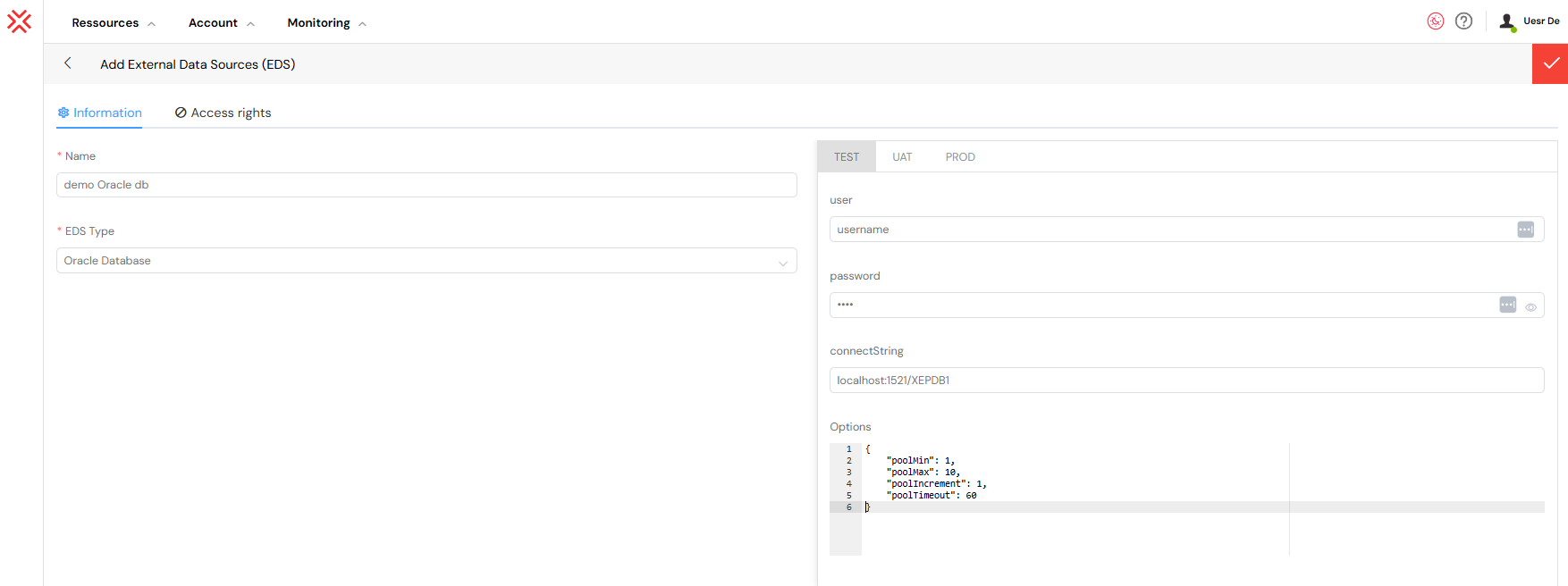
Connect String Formats: Softyflow supports multiple standard Oracle connect string formats:
- Easy Connect / Easy Connect Plus:
hostname:port/service_name - Two-Part Naming (TNS) Format: `(DESCRIPTION=...)(CONNECT_DATA=(SERVICE_NAME=...)))
2.4. Microsoft SQL ServerDirect link to 2.4. Microsoft SQL Server
Use this type to connect to Microsoft SQL Server.
Connection Parameters:
The configuration includes user, password, database, and the server address. The options object is particularly important for managing encryption and authentication.
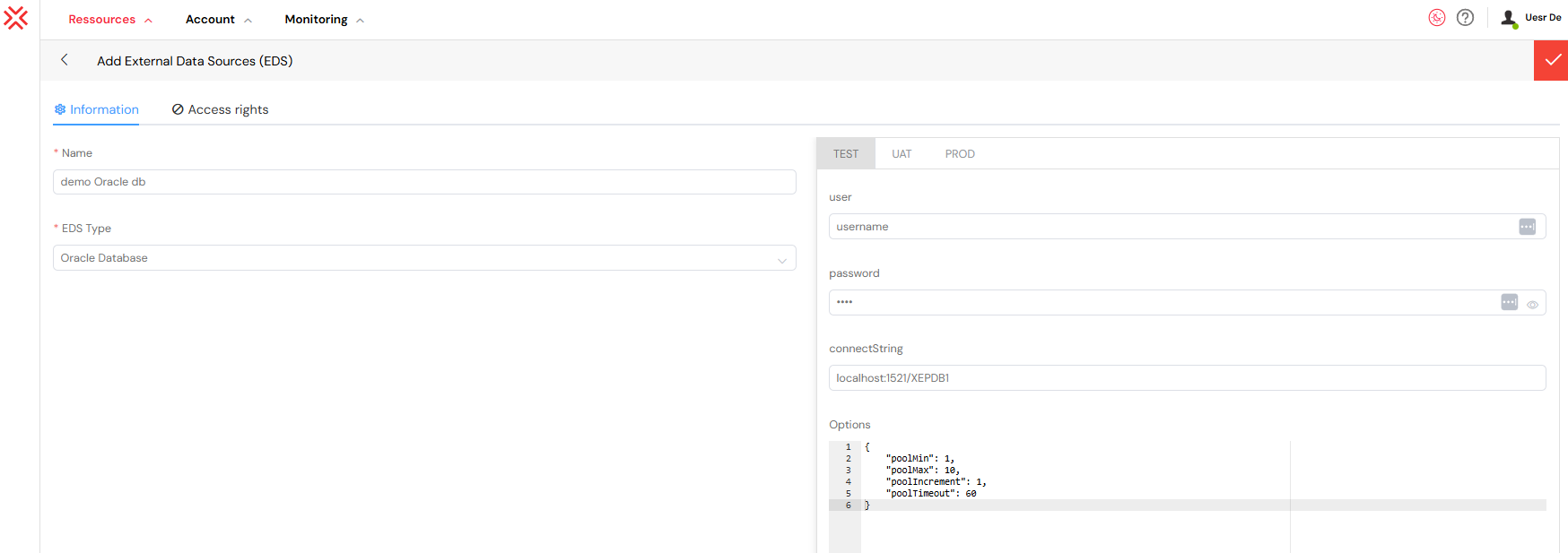
Alternative Authentication Methods: In addition to standard SQL authentication, Softyflow supports Windows Authentication (NTLM) and Azure Active Directory for seamless integration with Microsoft ecosystems.
Windows Authentication (NTLM):
{
  "domain": "YOUR_DOMAIN",
  "authentication": {
    "type": "ntlm",
    "options": {
      "userName": "username",
      "password": "password"
    }
  }
}
Azure Active Directory Password Authentication:
{
  "authentication": {
    "type": "azure-active-directory-password",
    "options": {
      "userName": "user@yourdomain.com",
      "password": "password"
    }
  }
}
2.5. SnowflakeDirect link to 2.5. Snowflake
Use this type to connect to a Snowflake data warehouse.
Connection Parameters:
Configuration requires your Snowflake account identifier (e.g., xy12345.east-us-2.azure), username, and password. You can also specify the default database, warehouse, and schema to simplify queries.
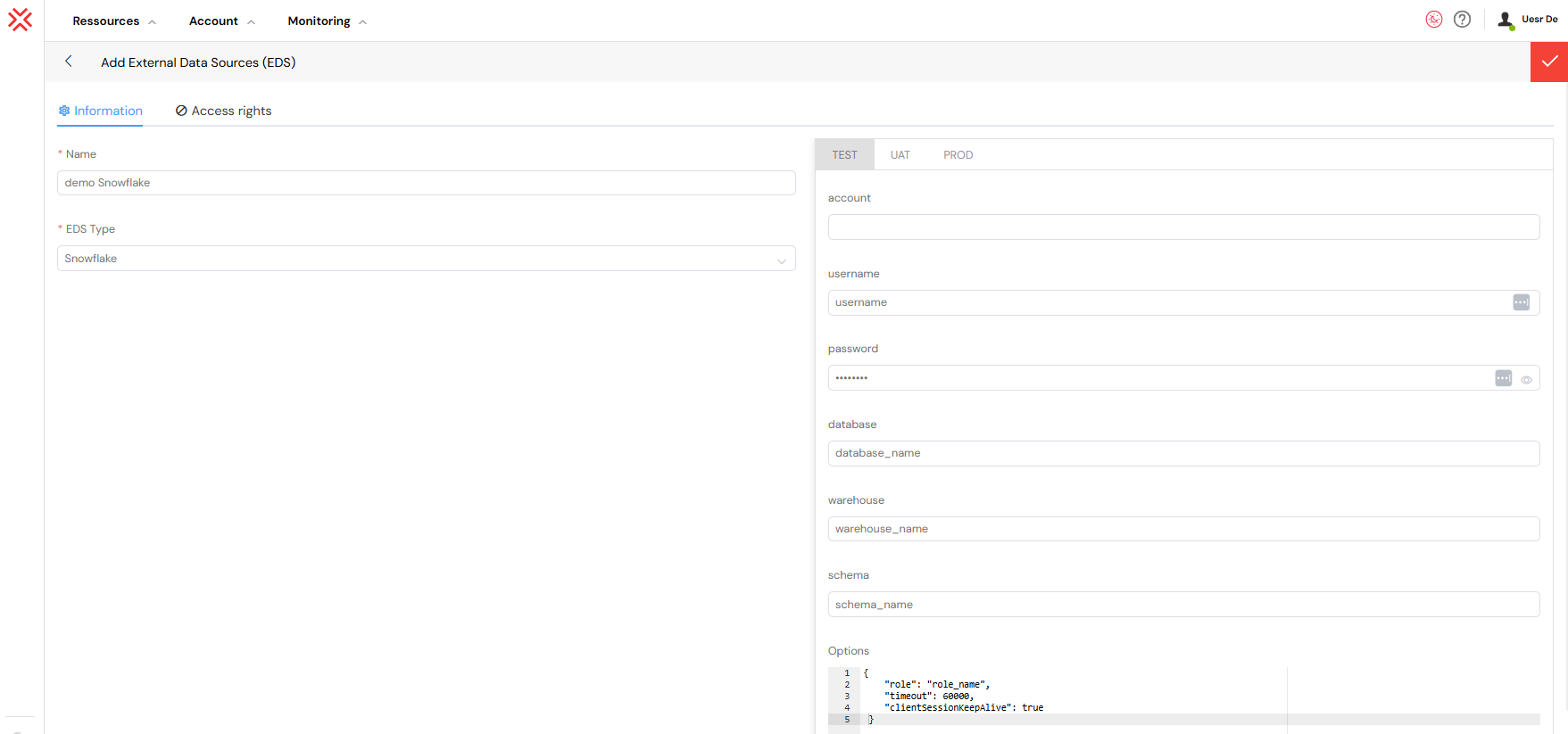
Key-Pair Authentication (for MFA):
For enhanced security, especially when multi-factor authentication is enabled, you should use key-pair authentication. This method uses a privateKey and an optional passphrase instead of a password.
{
  "authenticator": "snowflake_jwt",
  "privateKey": "-----BEGIN ENCRYPTED PRIVATE KEY-----\n...\n-----END ENCRYPTED PRIVATE KEY-----",
  "passphrase": "your_key_passphrase"
}
2.6. APIDirect link to 2.6. API
Use an API source to call a REST service from your application. It can connect to an internal service or a third-party platform. See the API guide for more examples.
Basic Configuration:
Set a baseURL, a request timeout and a connectionUrl for connection tests. Add shared headers if needed. A runScript runs before each endpoint call; for example, it can fetch an OAuth 2.0 token.
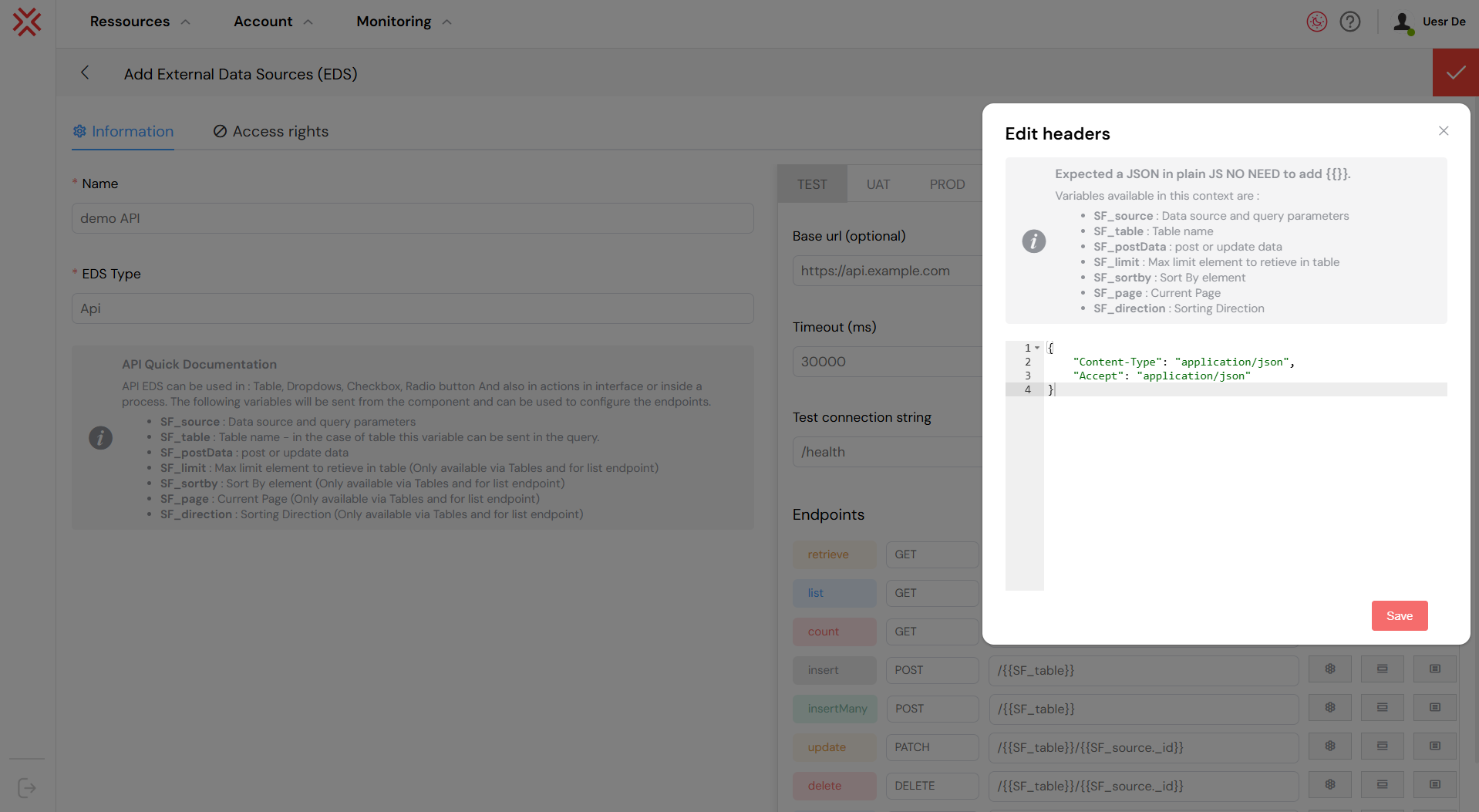
Endpoint Configuration:
An API source can have several endpoints. For each one, set the HTTP method, URL value, headers and parameters. Use a response script to turn the returned data into the format your application needs.
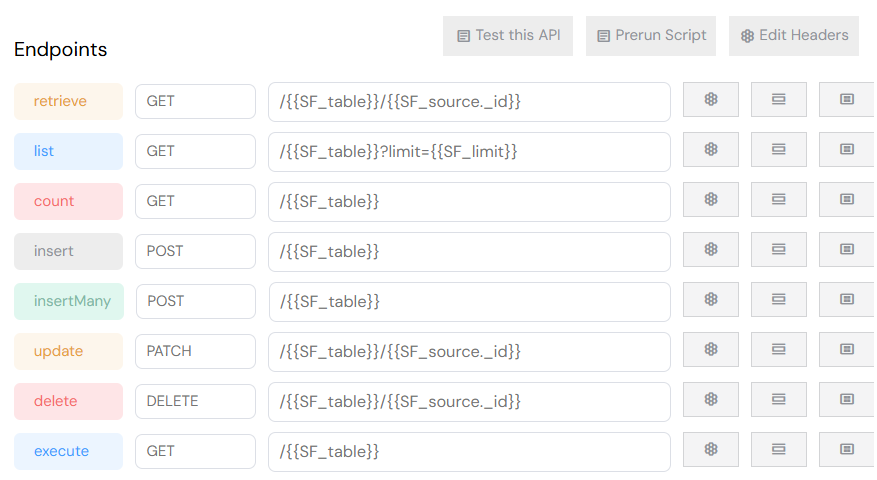
Available Endpoint Types:
retrieve: Fetch a single record by its ID.list: Fetch multiple records, with built-in support for pagination and filtering.count: Count the total number of records that match a query.insert: Create a new record.insertMany: Create multiple records in a single API call.update: Modify an existing record.delete: Remove a record.execute: A flexible type for custom operations that do not fit the standard CRUD (Create, Read, Update, Delete) model.
Available Context Variables: Within your endpoint configuration, you can use dynamic context variables to construct your requests, enabling powerful, data-driven integrations.

SF_source: An object containing the query parameters sent from the front-end widget or action (e.g., search terms, filters).SF_table: The name of the table or resource being queried.SF_postData: The data payload forPOST,PUT, orPATCHoperations.SF_limit: The maximum number of records to retrieve (for pagination).SF_sortby: The field name to sort the results by.SF_page: The current page number for pagination.SF_direction: The sort direction (1for ascending,-1for descending).
2.7. LDAP (Beta)Direct link to 2.7. LDAP (Beta)
LDAP connects Softyflow to a directory such as Microsoft Active Directory or OpenLDAP. Use it to look up user information or check a user’s identity. This source type is in Beta.
Connection Parameters:
Enter the server URL, the service account’s bind DN and its password. Use options for extra settings, such as tlsOptions for the secure connection.
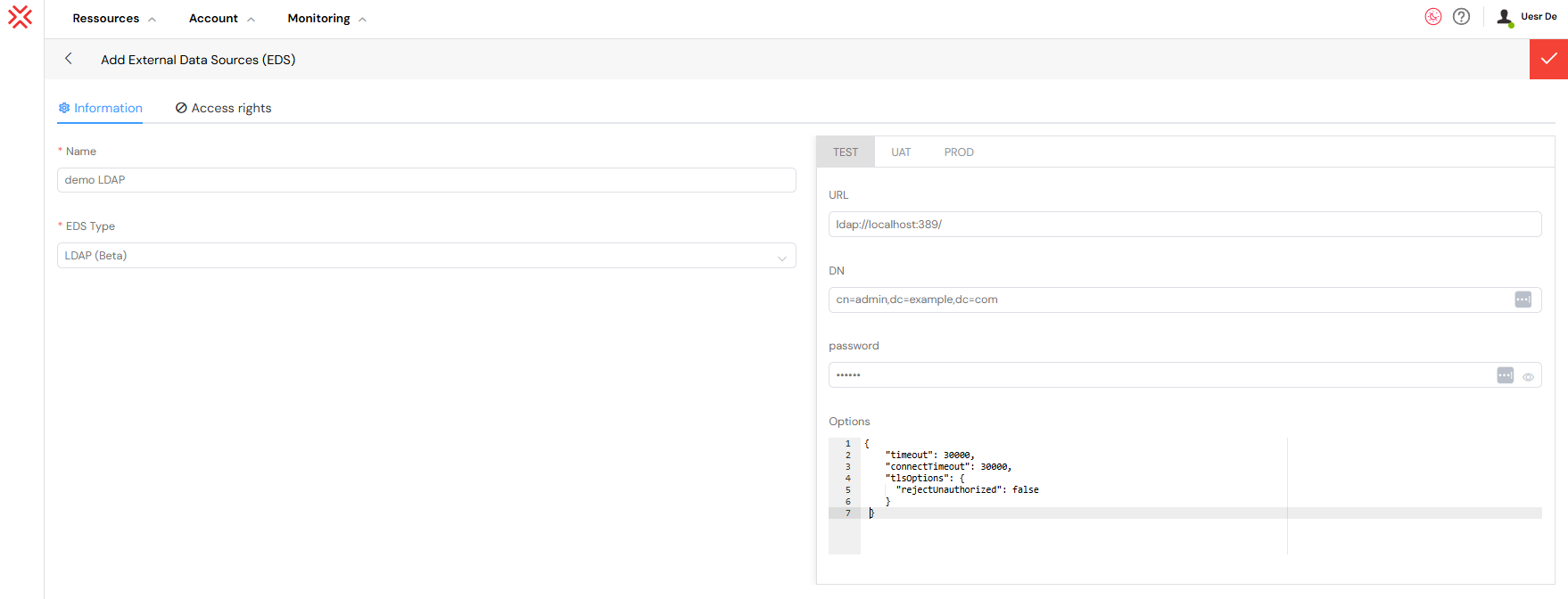
LDAPS (Secure LDAP) Configuration:
For a secure connection over SSL/TLS, use the ldaps:// protocol in the URL and provide the necessary certificate authority (CA) information to ensure the server's identity is trusted.
{
  "URL": "ldaps://ldap.example.com:636/",
  "DN": "cn=service_account,ou=services,dc=example,dc=com",
  "password": "service_account_password",
  "options": {
    "tlsOptions": {
      "ca": ["-----BEGIN CERTIFICATE-----\n...\n-----END CERTIFICATE-----"],
      "rejectUnauthorized": true
    }
  }
}
3. Environment and Access ControlDirect link to 3. Environment and Access Control
3.1. Multi-Environment SetupDirect link to 3.1. Multi-Environment Setup
Softyflow is architected to support a professional DevOps lifecycle by providing three distinct, isolated environments for each EDS configuration:
- TEST: Used for initial development and unit testing on a developer's local machine.
- UAT: A shared environment for User Acceptance Testing and quality assurance, closely mirroring production.
- PROD: The live production environment accessed by end-users.
This fundamental separation allows you to use different database credentials, API endpoints, or server addresses for each stage, creating a safe and reliable deployment pipeline from development to production.
3.2. Role-Based Access Control (RBAC)Direct link to 3.2. Role-Based Access Control (RBAC)
Set which roles can create, read, update or delete data. The JSON object maps each action to the groups allowed to use it. See Role Management to define those groups.
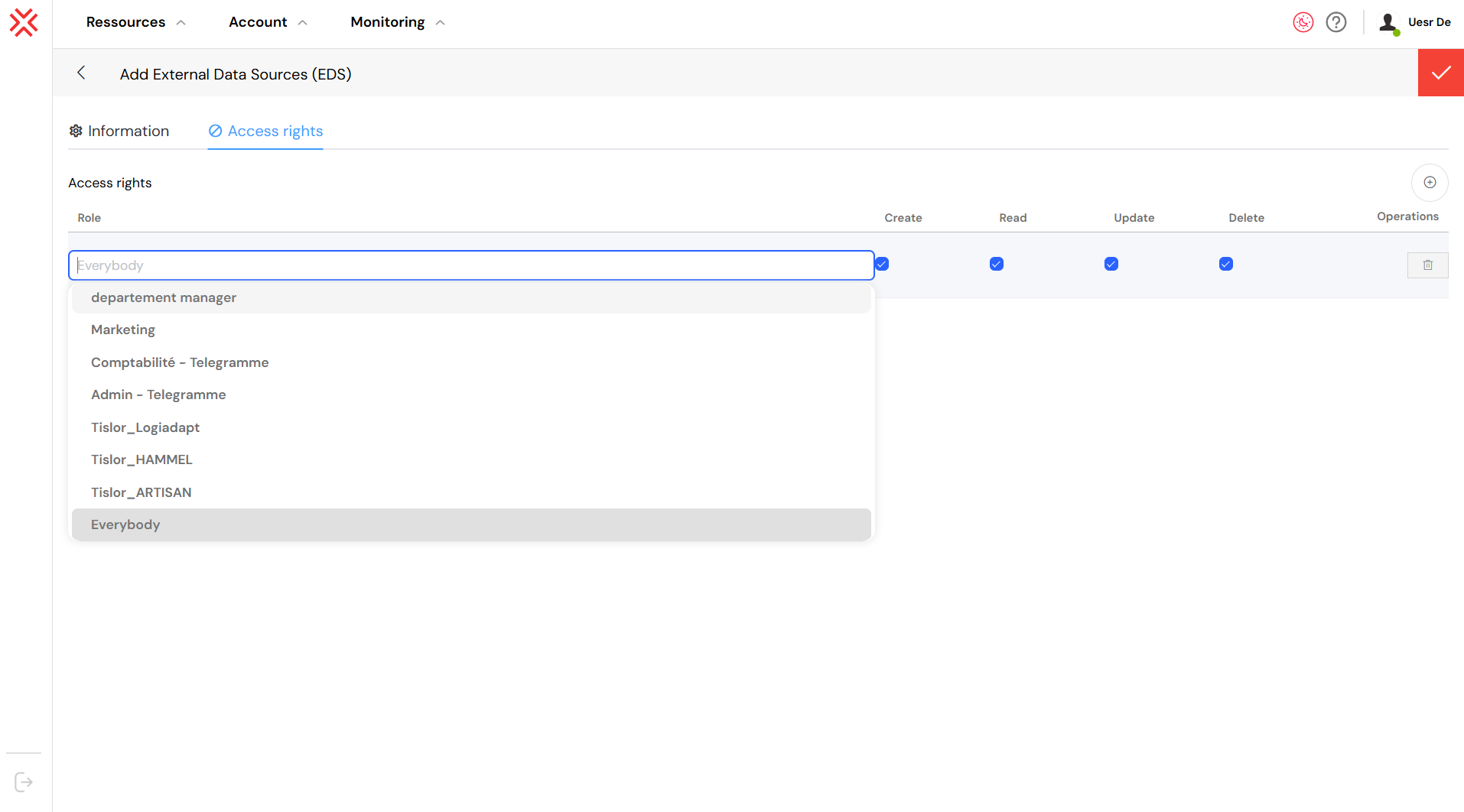
Available Permissions:
create: Allows users in the specified group to insert new records.read: Allows users to query and retrieve data.update: Allows users to modify existing records.delete: Allows users to remove records from the data source.
4. Integrating with Web Interface WidgetsDirect link to 4. Integrating with Web Interface Widgets
Widgets can read from an EDS to show data in a form. For example, a select field can list items from a database, and a table can show query results.
Configuration and Data BindingDirect link to Configuration and Data Binding
Open the widget’s settings in the Web Modeler. For a widget that supports data binding, choose the EDS, then select a method or enter a query.
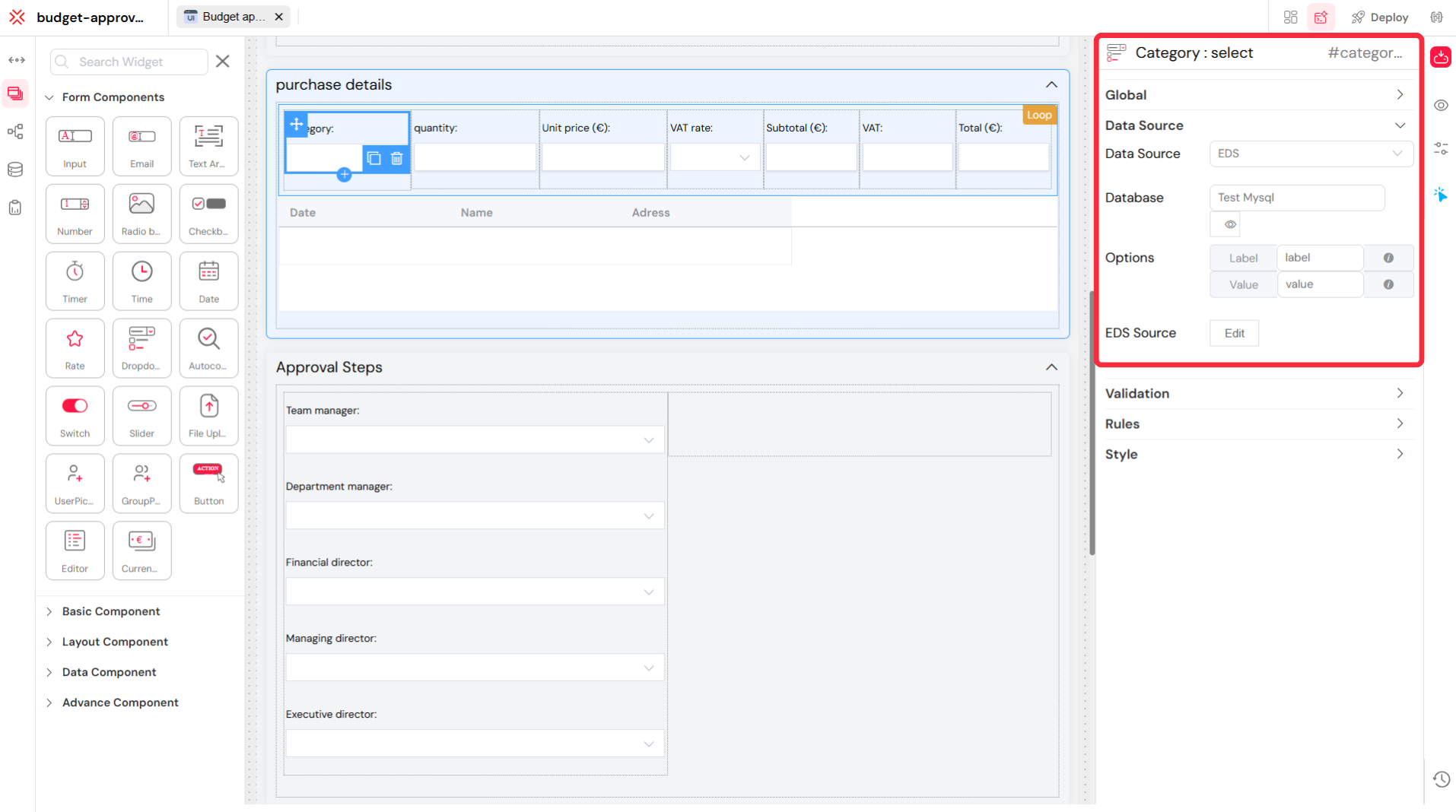
The binding process involves:
- Selecting the Data Source: Choosing "EDS" as the data source type.
- Specifying the Database: Selecting the pre-configured EDS connection (e.g., "Test Mysql").
- Defining the Data Retrieval: Writing a SQL query or selecting a predefined method to fetch the required data. For example, a
SELECT id, name FROM categoriesquery could populate a dropdown with category options.
Common Use CasesDirect link to Common Use Cases
- Dynamic Dropdowns: Populating
Selectwidgets with options fetched from a database table, such as a list of countries, products, or user roles. - Data Tables: Displaying records from an external database in a
Tablewidget, with support for pagination, sorting, and filtering. - Autocomplete Fields: Providing suggestions in text inputs by querying a database for matching results as the user types.
- Master-Detail Views: Creating interactive UIs where selecting an item in one widget (e.g., a customer in a list) dynamically updates another widget (e.g., a table showing that customer's orders).
This direct integration abstracts the complexity of data access, allowing developers to focus on building the user experience without writing extensive backend code for data retrieval.
For more detailed implementation examples and advanced configurations, please refer to the Usage in Widgets section of our development guide.
5. Testing the ConnectionDirect link to 5. Testing the Connection
Before saving any EDS configuration, it is essential to use the Test Connection button available for each environment (TEST, UAT, PROD).
- A successful test will display a confirmation message, indicating that Softyflow was able to establish a connection with the external system using the provided credentials and parameters.
- An unsuccessful test will return an error message. These messages are designed to be informative and are the first step in diagnosing the problem.
Common error messages include:
- "Connection timed out": Softyflow could not reach the server. This is typically a network issue.
- "Authentication failed" / "Invalid credentials": The username or password is incorrect.
- "Database not found": The server was reached, but the specified database does not exist.
- "SSL/TLS error": There is a problem with the security certificate configuration.
6. Security Best PracticesDirect link to 6. Security Best Practices
6.1. Credential Management:Direct link to 6.1. Credential Management:
Never hardcode credentials directly in configuration files. Use environment variables or a dedicated secrets management system (like HashiCorp Vault or AWS Secrets Manager) to handle sensitive information. Rotate passwords and API keys regularly.
6.2. Data Protection:Direct link to 6.2. Data Protection:
Always enable encryption in transit (SSL/TLS) for all database and API connections, especially in UAT and PROD environments. Sanitize all user-supplied inputs on the server-side to prevent SQL injection and other injection attacks.
6.3. Access Control:Direct link to 6.3. Access Control:
Apply the principle of least privilege. Only grant the permissions that a user role absolutely needs to perform its functions. Regularly audit data access logs to monitor for suspicious activity.
7. TroubleshootingDirect link to 7. Troubleshooting
7.1. Network and Firewall IssuesDirect link to 7.1. Network and Firewall Issues
- Symptom: "Connection timed out" or "Cannot reach server".
- Solutions:
- Verify Host and Port: Double-check that the server address/hostname and port are correct.
- Firewall Rules: Confirm that there are no firewall rules on the Softyflow server, the database server, or any intermediate network device (like a cloud security group) that would block traffic on the specified port.
- Ping/Telnet: From the machine running Softyflow, try to
pingthe database host or usetelnet <host> <port>to check for basic network connectivity.
7.2. Credential and Permission ErrorsDirect link to 7.2. Credential and Permission Errors
- Symptom: "Authentication failed," "Access denied," or similar credential-related errors.
- Solutions:
- Check Credentials: Carefully verify the username, password, and any other authentication tokens (e.g., domain for NTLM).
- User Permissions: Ensure the database user has the necessary permissions. For example, the user must have permission to connect to the database from the Softyflow server's IP address.
- Password Expiration: Check if the service account's password has expired.
7.3. Query and API Endpoint ErrorsDirect link to 7.3. Query and API Endpoint Errors
- Symptom: SQL syntax errors, API endpoint not found (404), or malformed request (400).
- Solutions:
- External Testing: Isolate the issue by testing the exact query or API request using an external tool (like DBeaver for SQL or Postman/cURL for APIs). This helps determine if the problem is in the query itself or in the Softyflow configuration.
- Verify Paths and Methods: For APIs, confirm the
baseURL, endpoint path, and HTTP method are all correct. A common mistake is usingGETinstead ofPOST. - Check Parameters: Ensure that all required parameters, headers, and payload data are being sent in the correct format.
7.4. SSL/TLS and Certificate IssuesDirect link to 7.4. SSL/TLS and Certificate Issues
- Symptom: "Untrusted certificate," "Certificate has expired," or "SSL handshake failed."
- Solutions:
- Certificate Validity: Ensure the server's SSL certificate is valid, has not expir ed, and is issued by a trusted Certificate Authority (CA).
- Self-Signed Certificates: For development environments using self-signed certificates, you may need to configure the connection to trust it (e.g., by setting
rejectUnauthorizedtofalsein the JSON options). This should never be done in production. - Full Certificate Chain: Some databases require the client to have the full certificate chain, including intermediate certificates. Ensure the
caproperty in yourssloptions is configured correctly.
8. Performance OptimizationDirect link to 8. Performance Optimization
8.1. Query Optimization:Direct link to 8.1. Query Optimization:
Ensure database tables have appropriate indexes on columns that are frequently used in WHERE, JOIN, and ORDER BY clauses. Use efficient queries, and always limit result sets with strict filtering and server-side pagination.
8.2. Connection Management:Direct link to 8.2. Connection Management:
Configure connection pooling with appropriate size and timeout settings to balance performance and resource consumption. A properly tuned pool minimizes the overhead of establishing new connections.
8.3. Caching:Direct link to 8.3. Caching:
Cache data that changes rarely, such as a list of countries. Decide when to refresh or clear the cache so users do not see old values.
This comprehensive guide covers all aspects of EDS configuration in Softyflow.