Page code reference (Vue.js)
Every SoftyFlow interface runs in the browser as one Vue.js 2 instance, with the Element UI components. The scripts of its Code page (opened with Open Action / Script Editor in the right rail of the builder) become the options of that instance. This page describes what each script must contain and what the code can use. For the editor itself (triggers, version history, editor themes), see The Code Page; for the no-code side, see Actions; for the classes called from the code, see the Web Modeler SDK.
1. How a page is builtDirect link to 1. How a page is built
When a page opens, SoftyFlow assembles one Vue instance from:
- the widgets of the builder: each field reads and writes its value in
this.models.<model>(the Model of the widget); - the scripts of the Code page: Functions become the methods, Variables the data, Computed the computed values, Watch the watchers and Filters the filters;
- the visual actions: each function of the On Click, Watch and On Mounted triggers becomes a method of the page, under its name; each Computed action becomes a computed value copied into
this.models.<name>.
When the page is mounted, the watchers start, then the On Mounted actions run one after the other, then the On Mounted script.
2. What the code can useDirect link to 2. What the code can use
In every script, this is the page (the Vue instance):
| Name | Content |
|---|---|
this.models | The values of the widgets, by model name. When the page opens a task, it starts with the variables of the task. |
this.SF | The SoftyFlow object of the SDK (startProcess, validateTask, setListFromCollection…). |
this.SF_mode | The environment of the page: test, uat or prod. Pass it to the SDK classes: new Collection({ id: 'orders', mode: this.SF_mode }). |
this.SF_connectedUser | The connected user: _id, firstName, lastName, fullName, mail, lg, roles, ideAccess, profilePicture and metadata (his user attributes for the environment of the page). |
this.SF_interfaceId, this.SF_projectId | The ids of the interface and of its project. |
this.SF_taskId, this.SF_instanceId | On a page opened as a task: the ids of the task and of its instance. |
this.SF_version, this.SF_lg | The version of the interface, and the language asked in the URL. |
| URL parameters | A parameter of the URL is available under its name: ?city=Paris gives this.city. |
| The keys of Variables | this.<key>. |
| The methods | The Functions and the functions of the visual actions: this.loadOrders(). |
The classes of the SDK (Collection, Users, SQLDatabase, SoftyTables, Report, Instance, Task, Api, Email, File…) and libraries such as moment and _ (lodash) are available in the code; this.$message({ type: 'success', message: '…' }) shows a message (Element UI).
3. The scriptsDirect link to 3. The scripts
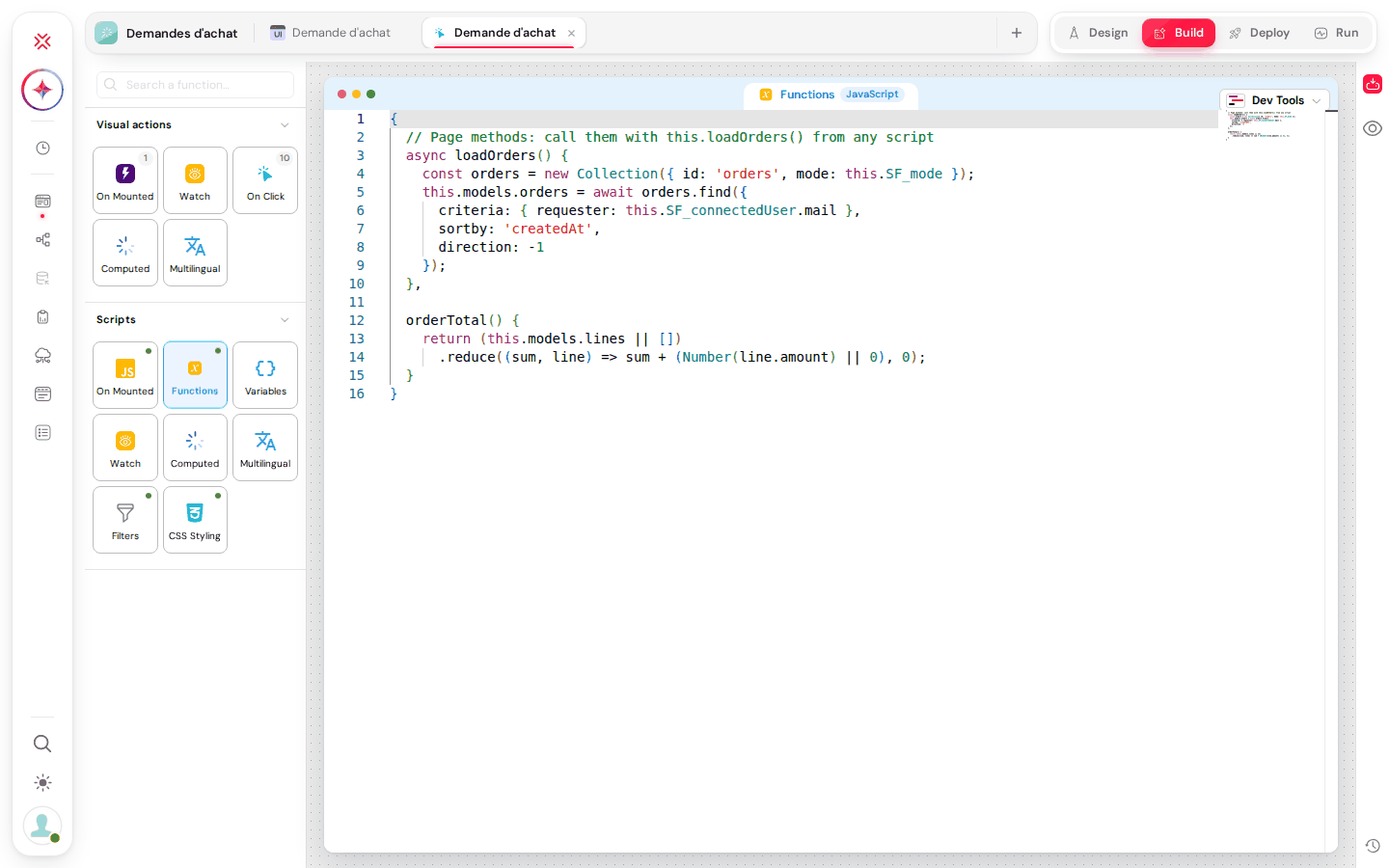
FunctionsDirect link to Functions
An object whose properties are functions: the methods of the page. A method can be async and use await.
{
  async loadOrders() {
    const orders = new Collection({ id: 'orders', mode: this.SF_mode });
    this.models.orders = await orders.find({
      criteria: { requester: this.SF_connectedUser.mail },
      sortby: 'createdAt',
      direction: -1
    });
  },

  orderTotal() {
    return (this.models.lines || []).reduce((sum, line) => sum + (Number(line.amount) || 0), 0);
  }
}
VariablesDirect link to Variables
An object whose keys become data of the page, read and written with this.<key>. Keep the values of the widgets in this.models.
{
  "loading": false,
  "statuses": ["draft", "sent", "paid"]
}
WatchDirect link to Watch
An object whose keys are the watched expressions (models.<model> for a widget) and whose values are functions (newValue, oldValue), or objects { handler, deep: true } to also watch the inside of an object or a list.
{
  'models.client': function (newValue, oldValue) {
    if (newValue !== oldValue) this.loadOrders();
  },
  'models.lines': {
    deep: true,
    handler(lines) {
      this.models.total = this.orderTotal();
    }
  }
}
A function of the Watch visual trigger on the same variable also runs: since 8.6, the watcher of the script runs first, then the actions, which receive SF_input.newValue and SF_input.oldValue (also in their nested actions, inside an if, its else branch or a loop). Before 8.6, the Watch actions replaced the watcher of the script.
ComputedDirect link to Computed
An object of functions that return a value computed from other values. The value is cached and updated when what it reads changes; read it with this.<name>.
{
  fullName() {
    return `${this.models.firstName || ''} ${this.models.lastName || ''}`.trim();
  }
}
MultilingualDirect link to Multilingual
The translation table of the page, in JSON: an array with one row per text to translate. Each row holds id_ (a generated identifier, such as input1_name), the text in the default language (column Default language(<code>): this text is the key looked up when the page runs) and one column per other language of the page.
[
  { "id_": "input1_name", "Default language(en)": "Last name", "fr": "Nom" },
  { "id_": "btn_submit_buttonName", "Default language(en)": "Submit", "fr": "Envoyer" }
]
The table is usually filled by the CSV import of the Multilingual visual action, which also sets the default language and the languages of the page. When the page runs, the texts of the widgets go through the SF_translate filter, which replaces them with the translation of the active language; use the same filter for your own texts in an HTML widget ({{ 'My text' | SF_translate }}). See Multi-language.
FiltersDirect link to Filters
An object of functions that format a value for display (Vue 2 filters).
{
  currency(value) {
    return Number(value || 0).toFixed(2) + ' €';
  }
}
On MountedDirect link to On Mounted
The body of a function, run once the page is mounted, after the On Mounted actions. this is the page and await can be used directly.
this.models.requester = this.SF_connectedUser.fullName;
if (this.SF_taskId) {
  // page opened as a task
}
await this.loadOrders();
CSS StylingDirect link to CSS Styling
The CSS of the page. It is loaded last, after every other stylesheet of the page (see Order of the Stylesheets).
4. Rules applied when the page runs (8.6)Direct link to 4. Rules applied when the page runs (8.6)
- A script that does not compile is ignored: if Functions, Variables, Watch, Computed, Filters or On Mounted does not compile (a missing bracket, a stray comma), that script is left out and the rest of the page works; before 8.6, the page stayed blank. The browser console names the ignored scripts:
SoftyFlow: the page code functions, watch does not compile, it is ignoredorSoftyFlow: the page onMounted code does not compile, it is ignored. If a method or a variable seems to be missing, open the console first. - Invalid widget rules count as false: an invalid Visible rule hides the widget, an invalid Required or Disable rule leaves the widget neither required nor disabled, and an invalid
{{ }}expression in a text is shown as written. They are listed in the console (SoftyFlow: parts of this page are ignored because they are not valid). - URL parameters cannot replace the page internals: a parameter named like an internal data of the page (
models,management,SF…, for example?models=1) no longer replaces it. - Watch actions and Watch script are cumulated (see Watch).
- Libraries loaded on demand: CKEditor is loaded only when the page has an Editor widget or names
DecoupledEditororCKEDITOR, the QR code reader only when the page containsqrcode, the Google API on the firstgapi.load(...)call. Code that uses one of them without these markers must load it itself (see The Code Page). - Calls checked by the server: the SDK calls of the page run with the rights of the connected user, and since 8.6 the server refuses some aggregation stages and criteria operators (see Rules applied by the server).
- Dates without time are stored at 12:00 UTC of the chosen day: compare days, not times (see How dates without time are stored).